Monday, November 24, 2025

Mod-8 - NEMA-11 stepper motor arrived today

Nema-11 tests well


Nema-11 stepper motor arrived today. Testing, it is a little better than expected. The maximum reliable speed with an A4988 controller that I could get was 10 revs per second, ie 600 rpm. That does represent fast step changes because each rev is 200 steps. It is therefore working with pulses as short as 250 microseconds for the high pulse and 500 microseconds for the repeating cycle. As predicted it will need a sleeve to increase the shaft diameter to 10mm. It would then run a 624 microsecond cycle for 27 steps to move the film 4.2mm in 1/60 second.


Sunday, November 23, 2025

Mod-8 Film - new idea or only a new name?

Tonight searching for ideas like Mod-8 Film. Found some! Invention ideas are like film script story ideas, the same ones keep coming up so often! I may however be building the first camera? I am building it because I want to film this way so knowing I am not alone in this way of thinking is reassuring!

"Sprocketless Film Camera" topic, 2013, in "FilmShooting Forum"
https://filmshooting.com/forum/viewtopic.php?t=24342 

Very much the same concept, right down to discussing a possible frame size that is close to my diagram:
"wado1942" wrote 
"...If you want to shoot 16:9, you can do it without cropping as well since you could probably get a 7.5mm x 4.2mm image...".
I am proposing 7.3mm x 4.1mm

Excellent discussion with good creativity happening. No sign of this getting as far as a working camera so I could still score a first there.

---------

Doing a google patent search finds
“Non-sprocketed microfilm stepping device”
https://patents.google.com/patent/US3248029A 
1963, James B Money, IBM

"...It is therefore an object of the present invention to provide a novel microfilm positioning system which is capable of positioning not only sprocketed microfilm, but non-sprocketed microfilm as well..." 

This includes ideas that can well be adapted for present day stepper motors. 
Patents expire after 20 years so this patent is helpful rather than a barrier.


Thursday, November 20, 2025

Mod-8 Film - Getting to know stepper motors.

This blog is active again after nearly 4 years. I have been focussed on the creative side of film-making. But a technical challenge appears and here goes with getting into microprocessors, robotic tech, and a new one for me: stepper motors.

Mod-8 is a project to modify and modernise Super-8 film and cameras:
Mod-8 Document One

Starting with: investigating stepper motors for film transport in cameras and digitisers. In previous robotics projects I was into servos for movement. The stepper motor is new to me. However the A4988 controller looks like a good helper so I have got to know that. I found helpful information in "How to Drive Stepper Motors with the A4988" a Youtube video from "Christopher's Factory":
https://www.youtube.com/watch?v=jsKug7eEzK8&t=49s

The sales websites describe having separate power supplies for control circuits (5V) and motor (8V or more). I had a 5V motor, VITECH 20BY, so I simply use one 5V power supply for everything and that is working just fine. 

For replacing motors in movie cameras, there are needs for speed that are pushing stepper motors to their limits. In the camera I am working on, Sankyo 620, it will need about 1500 rpm for the shutter motor and a step advance of 4.2mm in 0.02 seconds for the film drive motor.
The VITEC 20BY is a candidate shutter motor. How fast can it do continuous run? Answer: reliable up to 1800 rpm. On my test setup it stops rotating and buzzes unhappily at 2280 rpm. This means that it can work as a solution for the Sankyo 620 running at 18 frames per second, but not 24 frames per second. It happens to be easy to fit in as a replacement for the existing dead motor although it will need a change of gear wheel to get it down to about 1500 rpm. It delivers on precise speed control. It is however not giving me what I want which is a general replacement for many Super 8 movie cameras. That motor would need precise speed control over a range of 500 to 4000 rpm to fit the range of common camera speeds and camera to shutter gear ratios. The evaluation candidates are:

  • Other stepper motors. I am waiting on delivery of a "Nema 8".
  • DC motors with a speed measuring device attached. e.g "sensor module with photoelectric encoders".
  • BLDC motors. These are used in drones. The info I am reading so far is all about good high power performance. It is unclear to me how well they can for control at lower speeds and power levels. I have ordered one.
Elsewhere in the camera, I propose a stepper motor for intermittent film transport.

My first idea for this, based on the Nema 11 specs:

Command the Nema 11 to move 54 steps. 
Use its 5mm diameter drive shaft as the transport capstan.
Can do by programming an “Arduino Nano” microprocessor.
Nema 11 moves 1.8 degrees per step.
54 x 1.8 = 97.2 degrees
Distance = (97.2/360) * 5* pi
= 4.24 mm

Doing some stepper motor practical work gives a reality check.
To move 54 steps in about 0.02 second, needs each step to happen in 400 microseconds
My measurement of the VITECH 20BY is that its fastest reliable step time is 1500 microseconds.
Can the Nema 11 do better? I am still waiting for delivery to find out.
In the meantime, the most helpful info I have found is “Christopher’s Factory”
Christopher tests a Nema 17 with an A4988 driver board.
Christopher gives 350 microseconds as the fastest reliable high pulse. 
That suggests a fastest reliable step time of 700 microseconds which is not good enough.
Possible solution: a sleeve on the shaft to increase the diameter from 5mm to 10mm.

------------------------
Test setup


Mod-8 Film - putting more Super into Super-8 film

An idea for an improvement on 8mm wide movie film. I propose to use modern transport drives, eg stepper motors, so we can lose the sprocket holes. Use the space to go 16:9 widescreen. Modify and Modernise so call it "Mod-8".

Current master document:
Mod-8 Document One 


Wednesday, January 19, 2022

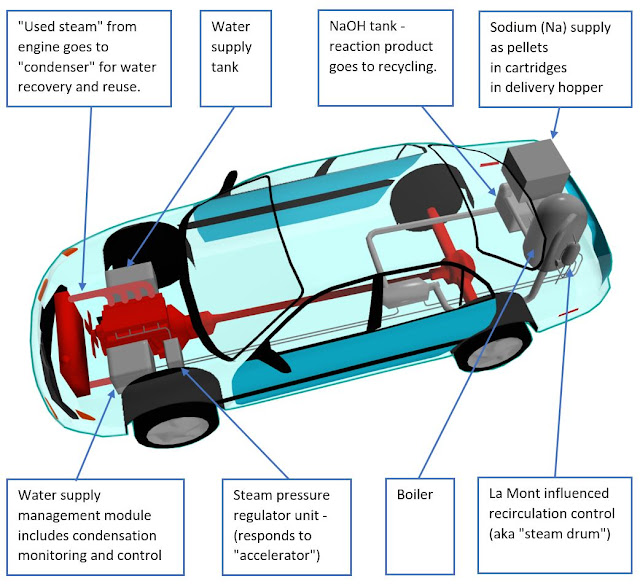
Sodium Cycle - Is this our Steampunk hero to fight climate change?

Update: 21 Nov 2025. In my opinion, current good progress with the sodium battery makes it more difficult for this technology to compete. This "Sodium Cycle" may have a niche role for heavy transport e.g. railways, shipping. I have paused my practical work on this.
-----------------------------------------------------------------

My alternative fuel proposal is an existing idea that needs a fresh look, so here are my design ideas for getting it to work. 

Lithium batteries have cost, resourcing and recycling issues. Sodium batteries may be better in future but progress is slow. We need climate change action urgently and we need to keep researching options. Straight up, this is a neglected and "fringe" option with a lot of challenges. Maybe it has a low chance of success. But it needs attention because if it works it has a lot of advantages. Starting with the possibility of converting existing vehicles including converting their engines - to steam! The main emission is water vapour. The reaction product sodium hydroxide would be recycled back into sodium metal by electrolysis. Therefore electricity is the energy source for this "sodium cycle". A major challenge is to achieve better efficiency with the electrolysis. Read on about the many other challenges and my suggested solutions.


Friday, October 8, 2021

Raspberry Pi excellent result as mini server

"Independent Alternative Film-makers" website running on a Raspberry Pi.

When I retired from Manukau Institute of Technology in 2020, they gave me a present of a "Raspberry Pi" ultra micro computer. The "Pi" is well known to educators and engineers as a "robot brain" device. This however is the latest version 4 which with 4 cores and 8 Gb of RAM can take on the "mini server" role. I therefore set out to migrate this website on to the Pi. It was on a PC with some green quality because it was recovered from recycled parts - but this PC idled at 40 W power consumption, and Pi idles at 4 W. "Idle" is relevant because websites like this typically have only small bursts at the moment of visitor connection with little or no load while a visitor reads a downloaded web page.

The Pi is small enough to hold within the palm of my hand.

In this photo I have created my own enclosure for it adapting a plastic container and adding a small cooling fan.


This website was a challenging candidate for migration to Pi because the tech was "Microsoft WebForms dotNet Framework" which is very much Windows tech. In programming terms this this about the most distant we can get from Pi and its Linux operating system.

About which Linux. The default Pi Linux is "Raspbian" which is optimised for the "robot brain" role. I use the optional alternative Ubuntu 64 bit which is more suitable for the "mini-server" role.

My old website had a "Microsoft SQL Server" database. Microsoft has recently released a version that can run on Linux including Ubuntu. I could not install it and on much searching discovered that it is incompatible with the "RISC ARM-64" CPU silicon chip at the centre of the Pi. The fix for that was a database migration to "Sqlite".

I went at first with using "mono". "mono" is an system that duplicates most of the functionality of "dotNet Framework" for Linux and some other non-Windows systems. This was off to a good start with minor code changes but to get more advanced details working needed more work. I could not get "Session" to work at all and I ended up needing to code an equivalent from the fundamental base of Session cookies. I also found the configuration and setup on Ubuntu to be hard work. I had fastcgi working for about a month then it stopped and I was unable to recover it. I switched to the simpler xsp4 which comes with warnings about it being a lesser test system although it worked well for me. After about 2 months, fastcgi mysteriously started working again, but by then I had moved to "dotNet Core 5".

My other programming is all on the latest "dotNet Core 5" and most of my programming community has also moved on to that leaving only a small population interested in the framework version of mono. I therefore took on the next level challenge and "got current". Fortunately my website makes only limited use of "WebForms" which are not supported in "dotNet Core 5". I was able to replace WebForms with "Razor Pages" which have a similar arrangement where we build 1 web page as 2 files: a "client side" page based on html, and a "server side code behind" page in the "C#" ( c-sharp) programming language.

I tried a little trick that worked, which was to keep the old aspx extension as part of the new name.
e.g. an old page with files:
 "NoticeEdit.aspx" and "NoticeEdit.aspx.cs" becomes new files:
 "NoticeEdit.aspx.cshtml" and "NoticeEdit.aspx.cshtml.cs".
The extensions "cshtml" and ".cs" get hidden under "dotNet Core 5" so the effective names are the same as before and the old menus and links still work.

From my experience, "dotNet Core 5" is smooth and easy to deploy on Linux. The extra programming work for migration is well rewarded by having a good, reliable deployment and run experience.

"Independent Alternative Film-makers" website running on a Raspberry Pi.


Stress testing the Pi by serving video.

Serving video across the internet is high demand for both a mini-server and its programmer (me). So I had to try it. Most videos on this website are relayed from Youtube or Vimeo. Here are 2 of substantial size, setup to play direct from the Pi.

Amandla! The anti-rugby-tour protests of 1981 (Excerpt) 150 MB

Chase Plaza - ASA School of Art students 1989 120 MB

(1) getting these to play and (2) being able to navigate the timeline to play any part of it, aka "scrubbing", are impressive - if they work - you can test this for yourself.

Saturday, March 30, 2019

Smartphone VFD-300 as an Infra-Red Camera by removing the IR-cut filter

Experimenting here is done with a Vodafone VFD-300 which appears to be a typical example of low cost smartphones. Vodafone have now replaced this model with the VFD-320 which appears to be physically similar but I have not had the opportunity to test one yet.

The VFD-300 can be converted to an effective Infra-Red camera by removing the "IR-cut filter"
The IR-cut filter is a thin glass or brittle plastic object at the back of the lens which blocks infra-red light.

Remove the device back cover.
Then take out screws to remove an internal plastic cover.
The camera is centre-top.

The lens unscrews. 
Hint: Count how many turns or part-turns to remove the lens. It will need to go back the same way to have focus. I counted 10 part turns which approx translates to 3 full turns.

Lens with IR-cut filter is on the left.
At some angles, reflected light looks red.

Lens on the right has had the IR-cut filter removed.


The IR-cut filter breaks easily by a light touch with a sharp metal object. Best to do this working in an open plastic container to catch the resulting very small pieces of broken .. glass? We can then clean it out with a wet paper towel or similar.

Removing the IR-cut filter makes a big difference in camera behaviour.
Interesting to see here that a dark red chair becomes one of the brightest objects in infra-red.


A modest IR LED light source gives IR vision up to 8m

The camera has a low light setting which appears to give a slow shutter speed, resulting in motion blur. I intend not to use that because of monitoring animals like rats where we do not want motion blur. Also we are likely to monitor at close distances of 1m to 2m and it looks like our infra-red lighting levels will be good enough to work well at the "normal" setting. With enough headroom to be able to run a lower power LED infra red light source.
Here for interest is the same shot taken on the low light setting.

The camera gains increased sensitivity for low levels of visible light, although with false colour in the image. I had 2 x VFD-300 phones available last night, one with this mod and one with a "normal" camera. So I could take photos of a back yard in fading evening light, both ways.

"Normal" camera:

IR-cut-filter removed.

"Normal" camera

IR-cut filter removed:


Monday, March 25, 2019

Snake Robot does Dancing in the Dark

This relates to efforts to save NZ native bird life from introduced predators like rats, possums and stoats which are a mis-match to our ecology.

There is a story going around the internet about snake robots. Here is the wikipedia version:
Also, snakebots can be used by animal control officers to subdue rabid or invasive creatures. Raccoons, barn cats, and large rodents typically respond to the snakebot's presence with attacks upon which the snakebot will emit an electrical shock and paralyze the aggressor. (retrieved from: https://en.wikipedia.org/wiki/Snakebot)
 The sources, which include at least 1 academic journal article:
(http://ijetsr.com/images/short_pdf/1522048019_1217-1222-oucip927_ijetsr.pdf)
appear to be quoting each other. I can find no first hand experience stories or other evidence for this.

There are 3 claims here:
  1. "snakebots can be used by animal control officers"
    Snake Robots are highly experimental and there may be only 10 in the world at the time of writing this - March 2019. They are not readily available to anyone except researchers and advanced hobbyists who build their own.
       
  2. "(pests) respond to the snakebot's presence with attacks"
    If there is any truth in this then it would give snake robots an important pest control "lure" advantage. Therefore IMO it is worth finding out.
      
  3.  "emit an electrical shock and paralyze the aggressor"
    Electric shock is used in some commercially sold rat traps so this may work.
Focussing on (2), can a snake robot attract pest attention? If this is an instinct for some animals, would they still have it after many generations in NZ with no contact with snakes? I am a practical person so late at night on the 16 Mar 2019, I was out in the bush with my snake robot and equipment to try to find out.
In brief: The result is inconclusive. No predators attracted but I was only able to get the snake robot running alone for 10 minutes.

Lots of problem-solving to get out there. It was a close decision to go ahead but it was good value as discovery of what the snake robot needs to do better.

Note - I am describing and naming products that worked well in this particular situation. I have no promo connection with their makers or sellers.

Where to put the Snake Robot?
I had access to a bush area north of Auckland. I found a dried up creek with a waterhole and I selected an earth bank above that as a good area. Later I got advice from a local farm manager who recommended the same place. I placed a "Trail Camera" there 2 weeks before the grand experiment and results from that showed possum activity. Here is the reconnaissance highlights video:


A Snake Robot needs Snake Skin
Showing off the snake workings has been good value for public demos, but it will not do for out in the bush. I asked my daughters about hosiery and they recommended heavy opaque pantyhose. Well done! I can report that "Columbine 50 denier (heavy) opaque pantyhose Mocha small" that I bought from the Farmers Trading Company was good value for both flexibility and protection.


Monitoring Cameras
The "TechView 720P Outdoor Trail Camera" bought from "JayCar" - NZ 169.00  Cat.no: QC8041 - had a success rate of 19 out of 26 trigger events in 2 weeks, ie 73 percent which is better than I expected. I set up its timer to record from 6:30pm to 6:30am ie at night with a little evening and morning. The highlights video above is from this camera.

I bought and assembled an "Infra-Red Spotlight Kit"  NZD 10.14 on special from "JayCar". Cat.no: KG9068. I modified it to run from a 5V powerbank through a boost module giving 9V. That needed use of 47 ohm resistors instead of the supplied 220 ohm. This gave me the opportunity to measure the efficiency of a boost module. Input is 5V x 1.1 A = 5.5W. Output running the 32 leds is 9V x 0.5A = 4.5 W. Efficiency = 4.5/5.5 = 0.82 (82 percent).

This "spotlight" did well at adding more infra red illumination, especially for the next item.

I dragged out an old Sony Handicam Video Camera of circa 2001 vintage. At that time Sony used CCD sensors which have good infra-red sensitivity and they had a "Nightshot" setting including an infra-red spotlight. Similar result to a trail camera but with the advantage of an optical zoom lens. I positioned myself 25m away and used this as my night vision to watch the test site.

SmartPhone as infrared monitoring camera?
In earlier trials at home I found 2 x smartphones that appeared to have some infrared sensitivity. This suggested the possibility of a wildlife monitoring camera with remote monitoring capability. However in these real bush conditions they were not sensitive enough. I have since tried finding and removing the "infra red cut filter" on an old phone but that only resulted in my breaking the camera. [UPDATE 30 Mar 2019 - tried this again on a Vodafone VFD-300  - found the infra-red-cut-filter in the back of the lens, broke it out and ... success - it is now an effective infra red camera. It has also gained increased sensitivity as a visible light camera although with false colours.  New blog post about this:
  http://hitechfromlotech.blogspot.com/2019/03/smartphone-vfd-300-as-infra-red-camera.html]


Needs remote control
I was watching from behind a large tree about 25m away from the snake. That was too far for remote control by bluetooth which was losing contact at only about 7m so I had the snake idling which gives a small "jiggle" movement. On the TODO list is to combine our open source software projects "XMSnakeRobot" and "XMRemoteRobot" to give long distance remote control over mobile data. As in run the snake robot and cameras from the farm house, which would get me well away from target animals which may want to avoid me.  I have made good progress on that in the last week.

Snake Robot needs an external power supply for this experiment
The snake robot runs on internal model aircraft lithium batteries which give it independent untethered movement - this seems to be a rare capability for existing snake robots. Sessions are limited to about 45 min indoors."In the wild" it only ran 10 min before the back battery ran out - I think the tail hit some real life outdoor resistance like digging into the dirt. I did try running from a "powerbank" but the current draw had peaks that were too high, often triggering the powerbank cutout. On the TODO list is to try running from 2 x powerbanks which may work because the front and rear halves of this snake robot are powered separately.

Photos

Target area with trail camera:

Snake Robot setup as seen by the trail camera


"Oldie but a goodie" - old Sony Handicam has infrared "nightshot". 

John Calder (author), with snake robot and important support equipment, navigating past cattle.


Update - 15 May 2023 - NASA is working on snake robots. They achieve movement with Archimedes screws. Excellent idea! 


Friday, March 8, 2019

Raspberry Pi and Rasbian OS disappointing result. TODO try Windows 10 IOT.

My common robotics architecture is:
Android Smartphone in the role of "Robot Brain" communicating via Bluetooth to Arduino MicroControllers in the role of "Spinal Cord".
I have done some experimentation with a "Raspberry Pi Zero" as an alternative "Robot Brain" and I revisited that today. I have setup and run the "Pi" for remote-control with VNC using "Pi Bakery":
https://www.pibakery.org/
which I have found to be excellent value. "Pi Bakery" installs "Rasbian" which is "Linux Debian" customised for "Pi". "Pi Bakery" includes additional customisation to get Pi to begin running by remote-control over WiFi or over a USB cable. No screen or keyboard required - Pi borrows your computer or laptop screen, mouse and keyboard.

Today started well. I ran my project "XMRemoteMonitor" which is a wildlife or security camera web app.
https://github.com/manukautech/XMRemoteMonitor
The functionality is all in the web app so no installation needed. I only needed to visit my  website with the built in "Chromium" browser. This does need to access the device camera. I had an expensive Pi special camera plugged in but the Web App could not find that. Then I plugged in an old general purpose Microsoft webcam from one of my boxes of old leftover tech and that worked including automatic plug-and-play recognition. All good so far, acting like any other device. The Rasbian desktop even gives me a Windows-like experience.

But then the Pi only took 27 webcam photos over about 5 min before completely freezing up. The screen was still visible and connecting via VNC but all controls were frozen. During that 5min I did get readings of 0.29 and 0.30 Amp for the current drain. This is similar to smartphone current draw when they run the same app. As a mostly Windows practitioner I have Linux friends teasing me about Windows freezing. Well! It appears Linux can do that too!

This gives me an idea for my next Pi trial. Install "Windows 10 IOT" which is a lightweight Windows 10 for small devices like the Raspberry Pi. Then run the same web app - will it go better?

Results in the web app:


Setup. The Raspberry Pi Zero is the small green circuit board sitting on a white powerbank.
Pi has 2 x micro USB ports. The left USB is fully functional and I have plugged the webcam into it with an adapter. The right USB is for power supply only.


Wednesday, February 13, 2019

Journey of the Rocket 03 - Water and Electronics do mix!

Link to full article on Facebook:
https://www.facebook.com/groups/nzrocketry/permalink/10161300046625696/

I am getting more and more interested in doing interesting things with low power rockets. It is education and robotics that led me to a rocket interest. My rocket-for-education design that started with a rocket motor of "E" power rating is now reducing and I am now designing for "B" power. The aims being:

  • to be able to launch from school grounds 
  • to take sensor readings
  • to do all-electric recovery.

I think even small rockets need to detect apogee with an altimeter to control recovery and the electronics involved are now small enough and low cost enough to work as part of a student project. The video shows - shock! horror! - a water rocket for prototype testing of an altimeter circuit. That does achieve proof of concept although I am having challenges with lightweight battery versus relatively power-hungry bluetooth module.

Journey of the Rocket 02 - Catapault(?!)

Link to article and video on Facebook:
https://www.facebook.com/groups/nzrocketry/permalink/10161245144325696/

Trying out some rocket design ideas eg air brakes by launching a test body with a catapault to get a close-up look at apogee behaviour. The air brakes do not deploy but I get some other good learning value. The tail fins seem to be remarkably effective at low speeds as in too effective. They are pointing the body nose down very soon after apogee which keeps the air flow going past the body from nose to rear which keeps the air brakes closed. I was hoping for some random airflow to catch the air brakes and help them open.

Tuesday, February 12, 2019

Journey of the Rocket 01

Rockets! These have been one small activity in the "HiTechFromLoTech" project, the idea being to use our by now sweet combo of smartphone-bluetooth-arduino as rocket and model aircraft flight recorders possibly leading to flight control. 2 students picked this up as their project at the end of 2018 and they have done excellent work with it, to the point that "Rockets" may take over as the flagship or number one activity here.


Sun 11 Nov launch day with NZ Rocketry at their launch field on a farm was excellent value for my students and me. Thanks to everyone for making us welcome. Special thanks to Alex for his help and advice and for flying our smart-phone-as-flight-recorder experiment, Thanks also to Jim Hefkey and Tristan O'Hanlon of APSS for their help and encouragement. Some findings: The lowest cost smart phone, Vodafone VFD-300, ($39 on special) did take video and record data. Data recording rate was about 15 samples per second. Our altimeter graph is close to Alex's TeleMega result. GPS results are approximate and the GPS biggest achievement is to place us on the farm. The most accurate GPS result is for walking down the track with the recovered rocket. The smart phone is working well after its flight experience. Jasmin gets a programming hero award. The day before she upgraded the user interface and data recording stopped working. On Sunday, Clinton drove while Jasmin did extreme phone programming. She got data recording up and running again minutes before the launch. Graphs are by our data analysis student Li who has been digging up her high school physics knowledge to analyse this. Our next experiment will be to try using GSM 3G cellphone data networking to send data to Earth while the rocket is in flight.

Alex loading our student instrument package into his rocket

Student instrument package in place


Data collection - smartphone records data into its SQL-Lite database


Data Analysis done post-flight - "Journey of the Rocket" 


Tuesday, December 11, 2018

XMRemoteRobot - SignalR - nice messaging but watch out for the size limit

Early successes with SignalR for Internet communications got us thinking, "let's use SignalR for everything!". Sending images from the robot camera being first on our TODO list. As in see through the robot's eyes. We attempted sending images as "base64" strings. We can share with you that SignalR does not handle big strings in one message. When we tried this we had no error messages and apparently almost-working results like the first image received as a small black image. That looked promising enough to keep trying until we thought of  testing with smaller message sizes and our broken communications started working.

Time for a Google search. "signalr maximum text length" which found
"There's no maximum message size but we recommend < 32K per message" on the Github home site. ref: https://github.com/SignalR/SignalR/issues/1205

That got us trialling different sizes of messages on XMRemoteRobot with the finding that our maximum reliable message string length is 32700 characters.

We process the still images from our robots into 'base64' encoded strings of about 640K in length so that is not going to work as a single chunk. Next steps in this development:


A possible alternative. "Ricardo" writes about achieving video streaming without audio over SignalR:
https://weblogs.asp.net/ricardoperes/video-streaming-with-asp-net-signalr-and-html5

Saturday, August 18, 2018

Big Update! XMRemoteRobot 2.0 speeds up with SignalR

Big advances in our open source server app for remote control and/or remote monitoring over the Public Internet.

XMRemoteRobot 2.0 is a major rewrite replacing "http long polling" with "signalr" giving faster, more direct communication. The latency (delay or lag time) is down to 10ms on local networks and 70ms over a 4000 km test. The new app replaces the database with in-memory objects. This means that the download is ready to run immediately in Visual Studio 2017. This also makes for easier  deployment..

Downloads and more details at: https://github.com/manukautech/XMRemoteRobot

Live Demo - test drive this app at:
https://xmrrnz.manukautech.info - Server located in Auckland, NZ.
https://xmrrae.azurewebsites.net - Server located in Azure "Australia East".
https://xmrrwu.azurewebsites.net - Server located in Azure "West US".
You can see the (low) latency at different distances.

For pages "Test01" and "Test02", commands travel from the left side of the page, to the server, then back to the robot code separated into an iframe on the right side of the page. Or to your smartphone-acting-as-robot when you navigate that to pages "Robot01" or "Robot02". Therefore multiply the distance to the server x 2 for the remote control distance.

"signalr" is a Microsoft-sponsored open source project which implements "WebSockets".

Sunday, June 24, 2018

Snake Robot moves faster - sideways

Snake Robot - moving faster. I would say "baby steps" meaning improvements in small steps except that snakes do not step, they have "gaits", so this is progressing by "baby gaits".

System voltage is up from 5V to 6V to get more servo torque. Achieved by replacing step-down "buck" voltage regulators with "buck-boost" regulators which have both step up and step down capability. This means that they can maintain 6V over the range of 2-cell lithium battery supply voltage: starting at 8.4V and dropping in use as they drain to the lowest operational limit of 6.4V.

More important: A new programming approach for gaits that makes development easier and the code more self documenting. With this comes the programming of new gaits that perform well along my workbench but not so well across the floor. Except for "rectilinear reverse inchworm double wave ripple" which does move faster, but sideways, which is a surprise, very different to the programming good intentions. Great movement, now we only need to sort out the lesser issue of going where we command.

XMSnakeRobot is an open source project (Apache License) with programming code and designs published on "Github".
https://github.com/iafilm-makers/XMSnakeRobot

Gait coding:
https://github.com/iafilm-makers/XMSnakeRobot/tree/master/CodeBrainAndroidJavaScriptDroidScript/XMSnakeV07

Coding in JavaScript for the best gait so far, the "rectilinear reverse inchworm double wave ripple", is pasted below.
Gait "functions" now consist of data in arrays specifying cycles of servo angles. These arrays are interpreted by common code in the main program.

function Gait02() {

    var vert = [
        [-30,  20,  20, -20,   0, -20,  20,  20, -20,   0],
        [-10, -20,  20,  20, -20,   0, -20,  20,  20, -22],
        [-10,   0, -20,  20,  20, -20,   0, -20,  20,  15],
        [-10,   0,   0, -20,  20,  20, -20,   0, -20,  40],
        [-30,  40, -20,   0, -20,  20,  20, -20,   0,   0]
    ];

    var horiz = [
        [  0,   0,   0,   0,   0,   0,   0,   0,   0,   0],
        [  0,   0,   0,   0,   0,   0,   0,   0,   0,   0],
        [  0,   0,   0,   0,   0,   0,   0,   0,   0,   0],
        [  0,   0,   0,   0,   0,   0,   0,   0,   0,   0],
        [  0,   0,   0,   0,   0,   0,   0,   0,   0,   0]
    ];

    return [vert, horiz];
}

Saturday, January 20, 2018

XMSnakeRobot - Review of a possible robot brain - SmartWatch X01S Android 5.1

Our small robots need small but powerful Android devices as a central controller computer ie "brain". We have been using low cost Vodafone VFD 300 SmartPhones but they are a little large and heavy for our new robot designs. Preferably running the same Android OS with the capability of programming in JavaScript using the DroidScript framework. We also need a sideways pointing camera,

The candidate devices are:

"X01S SmartWatch" - currently testing. Good results so far, details below. At 64g it is a little heavy but physical size is good and it has full Android 5.1 features and good performance with 1 Gig of RAM which is better than the 500 Meg of the VFD 300 and the other candidates..

"QW09 SmartWatch" - we have bought and tested a "DZ09" which is the same physical hardware with a "Nucleus" operating system. We were unable to program the "DZ09". We do discover that it has a sideways pointing camera and a weight of only 38g. The more expensive Android version "QW09" has Android 4.4 and 500 Meg of RAM which is low end, but that low weight is a very attractive feature. Possible TODO = buy and evaluate QW09.

"Raspberry Pi Zero" - this is physically larger than the SmartWatches although less weight at only about 10g. We can buy an optional extra camera, only about another 2g,  that attaches with a flexible ribbon cable which can fit robot layout needs. "Pi Zero" can be programmed in JavaScript with a different framework "node.js". The current biggest barrier and still under investigation is GSM communication - ie cellphone data comms which appears to be a complex and challenging exercise involving connecting a GSM modem to a USB port. The GSM modem has a weight of 21g losing much of the "Pi Zero" weight advantage although we have the option of using USB cabling to separate it from the "Pi Zero" and away from the robot "head" to get better weight distribution. Another issue is that microphone, speaker, motion sensors, GPS are all add on extras for the "Pi Zero" where the X01S has them in the package.


X01S in detail.

As a SmartWatch

Before removing the straps and going robot-brain, I did try it out as a wearable.
The X01S works well as a watch and it is a very capable complete SmartPhone. It has a solid metal case which is good for a SmartWatch but not so welcome in a robot brain. I was able to type with my big clumsy finger on a tiny screen while feeling surprised that this was working so well. The improving Google speech recognition is a welcome alternative to typing. Websites are surprisingly readable. Making phone calls and texting is all do-able.

I mail-ordered the X01S from an "AliExpress" seller - "Xiao mi World Store".
Cost including shipping was just under 100 New Zealand dollars which is about 70 US dollars.
On arrival I swapped the SIM card over from the VFD 300 and the X01S was all go with Vodafone New Zealand.

I wanted to get screen lock working with a PIN number. I searched through many options looking for this before finding it under the rather less than obvious "VPN".
That is "Settings" -- "Wireless & Networks" -- "More" -- "VPN"


As a Robot Brain - so not the usual kind of review!

The "DroidScript" framework downloads from the Google Play Store and works fine. DroidScript  remote coding over Wi-Fi from a full size computer works which is an essential need for a small device. All my code created on the VFD 300 SmartPhone copied across and ran on the X01S. I use the HTML hybrid interface coding option which I understand may be relatively high demand for the device, so well done X01S.

Bluetooth, Wi-Fi and GSM Data all perform well.

Removing the straps was a challenge. They are held by what looks like a screw at each end of a rod but there is only one small screw threading into the end of a long rod. I needed to try both ends to find the end where the screw unscrews then push the rod out from there. On pushing the rod out about 3mm it becomes easy to grab and pull the rest of the way.
Then I discovered as is common with SmartWatches that there are antennas in both watch straps. So it was replace the rods then peel the backing off the straps to unstick the antennas. Doing this, one of the antenna wires pulled out of the watch. However GSM, WiFi and Bluetooth are working well with only one antenna so I am continuing with that. (Maybe I have lost GPS? Todo check),

Strap removal is difficult compared to the DZ09 / QW09 design.
If I was to do this again I would cut the straps 33mm from where they meet the device, although this depends on how the device needs to fit into the robot.
My complete strap removal gave a weight reduction from 85g to 64g.

Other robot brain points of interest:
Is it possible to run and/or recharge from the robot power source?
Yes. External power (5V)  is a little unusual being metal touch pads contacted by the USB charger. I would need to make a mock charger but that does look doable. See photos below. The supplied charger unit could become part of a robot but it has magnets in it giving it a relatively high weight of 29g.
The battery weighs 13g so it would be possible to run with that removed and get the unit weight down to 51g. I plan however to keep the battery in the watch for the convenience of being able to work with the watch while the rest of the robot is switched off. Good also to be able to remove the watch from the robot for better access to it for setups and adjustments.

Photos:

Strap removal surgery. Sticky antenna revealed.


Straps removed. X01S with 1 antenna. On the weighing machine.


X01S running my Snake Robot Brain code. That app "XMSnakeBrain" along with other code and designs from the "XMSnakeRobot" open source project is on Github:
https://github.com/manukautech/XMSnakeRobot


X01S, straps removed, showing antenna.
There are 2 buttons and the camera on the right side of the X01S.
The camera lens is in the middle.


X01S with charger unit which also acts as the USB adapter.
The 4 pins are a custom USB connection with the outside 2 pins as GND and V+ (5V).


Photo taken with the X01S. Street scene.


Photo taken with X01S. Interior old machinery. Low light, twilight outside.


Test run of remote control of X01S with "AirDroid" and "AirMirror".
The "AirMirror" window mirrors the app running on the X01S.
There is also a camera window so we can see what the Snake Robot is seeing.
In this screenshot I have a snake robot looking at me.


Link to X01S on "Xiao mi World Store" as at 21 Jan 2018.
These links change a lot as do the manufacturing runs of changing device designs.
If you are a future reader finding this link dead, you can try searching AliExpress for "SmartWatch X01S".
https://www.aliexpress.com/item/2017-New-3G-WiFi-X01S-Android-Smartwatch-Phone-Bluetooth-Smart-Watch-1-3GHz-Dual-Core-IP67/32825965106.html


Sunday, December 31, 2017

XMRemoteRobot - movement achieved with "inchworm gait"


Snake Robot hardware milestone today -  reliable ongoing operation responding to servo commands. Now we have a testbed, the first programming exercise is the "inchworm" gait which is the simplest of snake robot "gaits".

The biggest challenge in the last 3 days has been the head section intermittently going dead as its Arduino Nano microcontroller resets itself. After a lot of detective work I tracked it down to momentary voltage drops. The power supply to the forward section was through thin wires that gave a voltage drop from about 5.3V to 4.8V. There were extra momentary voltage drops when servos came under load and that caused the microcontroller resets. The fix was to run a second parallel pair of wires, V+ and GND from the regulator on Rib05 to the power board on Rib02. That may not be the full story because adding these similar thin wires resulted in a minimal voltage drop rather than halving the effect as expected. It is therefore a good idea to check sections in detail for an unexpected resistance effect.

Tuesday, December 26, 2017

XMSnakeRobot - waggles its head and tail


Youtube video. Testing starts with hand-typing simple command signals.

XMSnakeRobot - we have digital control - 20 out of 20 servos responding.

Milestone tonight (Tue, 26 Dec 2017).
The snake robot "spinal cord" is working. That is 20 servos are responding to remote signals as planned.

Looking at my previous issues of "rogue" servo movements.

Try changing from Arduino Nano to Wemos D1 - a different microcontroller.
I did that - a major change, and the servo bad behaviour was THE SAME!. This prompted me to look harder at my code. After digging deep I did find a "bug". Coding fix gave a successful system fix.

Working on other issues.

Issue: One Arduino also resets itself when servos encounter loads like lifting the snake robot's head.
That head section has 40cm of thin cables supplying power from the centre of the Snake Robot. These have a significant voltage drop - typically 5.1 volt dropping to 4.8 V with momentarily dropping lower when servo loads kick in. 
I got a small improvement by cranking up the regulator to 5.4V. 
I got a further improvement by adding a 470uF capacitor and 39 ohm resistor to the Arduino Nano power supply cable - all good on individual servo testing [LATER - resets still happening on multi-servo movements trying out movement "gaits"]

Hypothesis: Try the "volatile" coding keyword for my servo array.
Made no difference. Also "volatile" triggered a compile error with the Wemos board. That puts a stop to trying "volatile" because I want to leave the way open to using Wemos boards.

Photo: Snake Robot as at 26 Dec 2017.


Photo: The Android Smartphone is running app "Serial Bluetooth Terminal" by Kai Morich.
Signal "A2+020" = "Target microcontroller 'A', Target Servo 2, Set to +20 degrees from centre position."